Keyword cannibalization happens when multiple pages on the same website compete for the same keyword or search intent. Instead of helping your site gain more visibility, these pages can divide ranking signals, confuse search engines, and prevent your strongest page from reaching its full potential.
That said, keyword overlap is not always harmful. A website can rank multiple pages for similar terms without experiencing a problem. The key is determining whether those pages serve different purposes or are directly competing for the same search result.
In this guide, you will learn how to check for keyword cannibalization, identify genuine ranking conflicts, choose the correct page to prioritize, and fix overlapping content without damaging your organic traffic.
What Is Keyword Cannibalization?
Keyword cannibalization occurs when two or more URLs on the same website target the same keyword and satisfy substantially the same search intent.
Because the pages are so similar, search engines may struggle to determine which URL is the best result. Ranking signals such as backlinks, internal links, topical relevance, and user engagement can become divided between the competing pages.
As a result, the wrong page may rank, positions may fluctuate, or neither page may perform as well as one consolidated resource could.
A Simple Keyword Cannibalization Example
Imagine a digital marketing website publishes these two articles:
- “How to Perform an SEO Audit”
- “Complete SEO Audit Guide”
Both pages target the keyword “SEO audit” and provide nearly identical information.
Google may alternate between the two URLs because it cannot clearly determine which one to prioritize. One page might rank in position eight one week, while the other appears in position twelve the next.
If the website combined the strongest content from both articles into one comprehensive guide, the consolidated page could receive stronger internal links, more backlinks, and clearer relevance signals.
Keyword Overlap vs. True Cannibalization
Two pages ranking for related keywords do not automatically indicate keyword cannibalization.
For example, a dental website may have separate pages for:
- Dental implants
- Dental implant costs
- Dental implant recovery
- Dental implant consultations
These pages belong to the same topic cluster, but each one satisfies a different search intent.
True cannibalization usually occurs when multiple pages:
- Target the same primary keyword
- Address the same search intent
- Contain substantially overlapping information
- Compete for the same position in search results
- Cause ranking signals or conversions to be divided
The problem is not simply that multiple URLs receive impressions for the same query. The problem is that those URLs are competing instead of supporting one another.
Why Keyword Cannibalization Can Hurt SEO Performance
Keyword cannibalization can affect rankings, traffic, authority, and conversions. Its impact depends on the importance of the keyword and the strength of the competing pages.
Unstable or Fluctuating Rankings
One of the clearest symptoms is frequent URL switching.
Google may rank one page for several days and then replace it with another page from the same domain. This often leads to unstable positions because each URL has different relevance, authority, and engagement signals.
Ranking fluctuations are not always caused by cannibalization, but frequent switching between similar URLs deserves investigation.
Diluted Backlinks and Internal Authority
When several pages cover the same topic, external websites may link to different versions. Internal links may also be distributed inconsistently.
Instead of directing authority toward one preferred resource, the website divides that authority between multiple URLs.
Consolidating competing pages can create a stronger destination for backlinks and internal links.
Lower Click-Through and Conversion Rates
The page Google selects may not be the page you want users to visit.
For example, an informational blog post may outrank a commercial service page for a high-intent keyword. The blog post may receive traffic, but it may not generate the same number of inquiries, bookings, or sales.
In this situation, the website is visible, but the wrong URL is handling the search demand.
Wasted Crawl and Indexing Resources
Large websites can accumulate many thin, outdated, or repetitive pages.
Search engines must crawl and evaluate each URL. When several pages cover the same subject without adding distinct value, crawl activity may be spent on redundant content instead of more important pages.
This is especially relevant for ecommerce websites, publishers, directories, and websites with thousands of indexed URLs.
Common Signs of Keyword Cannibalization
You may have a cannibalization issue when you notice one or more of the following patterns.
Multiple URLs Ranking for the Same Keyword
If several URLs receive impressions or rankings for the same valuable query, review whether they satisfy the same intent.
Multiple ranking pages can be beneficial, but several nearly identical pages may be competing.
Frequent Changes in the Ranking URL
Track which URL appears for the target keyword over time.
If Google repeatedly switches between two or more pages, those pages may be sending conflicting relevance signals.
A Lower-Priority Page Outranking the Preferred Page
A category page, outdated article, tag archive, or informational post may outrank the page designed to convert visitors.
This often indicates that the preferred URL needs stronger content, internal links, backlinks, or intent alignment.
Rankings Declining After Publishing Similar Content
A new article may unintentionally compete with an established page.
If an existing page loses rankings shortly after a similar page is published, compare their keyword targeting and content structure.
Several Pages Receiving Impressions but Few Clicks
Search Console may show that multiple URLs receive impressions for the same query, but none attracts meaningful clicks.
This can happen when search visibility is divided across pages that are not strong enough to rank prominently.
How to Check for Keyword Cannibalization
A reliable cannibalization audit should evaluate keywords, URLs, search intent, ranking history, and business value.
Step 1: Create a List of Important Target Keywords
Start with the keywords that matter most to your website.
Prioritize terms connected to:
- Revenue
- Leads
- Product sales
- Service inquiries
- High organic traffic
- Strategic topic clusters
- Declining rankings
- Important landing pages
You do not need to evaluate every keyword immediately. Begin with high-value queries where ranking conflicts would have the greatest impact.
Step 2: Identify Every URL Ranking for Each Keyword
For each target keyword, list all URLs that receive impressions or rankings.
Record useful metrics such as:
- Ranking URL
- Average position
- Clicks
- Impressions
- Click-through rate
- Conversions
- Page type
- Publication date
- Backlinks
- Organic traffic
This information will help you determine whether visibility is being divided.
Step 3: Compare the Search Intent of Competing Pages
Search intent is one of the most important parts of the analysis.
Determine whether each page serves an:
- Informational intent
- Commercial investigation intent
- Transactional intent
- Navigational intent
- Local intent
Pages that target the same keyword but satisfy different intents may deserve to remain separate.
For example, “best accounting software” and “accounting software pricing” are closely related, but users searching those terms may expect different content.
Step 4: Review Ranking and Traffic Trends
Look at performance over several weeks or months rather than relying on a single day.
Check for:
- Frequent URL switching
- Declining clicks
- Falling average positions
- Traffic split between similar pages
- A new page replacing an established page
- Seasonal or algorithm-related changes
Historical data helps distinguish persistent cannibalization from ordinary ranking volatility.
Step 5: Select the Preferred URL
Choose the page that should rank for the keyword.
The preferred URL should ideally:
- Match the dominant search intent
- Provide the strongest and most complete content
- Have valuable backlinks
- Receive relevant internal links
- Generate conversions
- Fit the website’s broader content strategy
- Use a stable, descriptive URL
- Offer a strong user experience
Once the preferred page is selected, other competing pages can be consolidated, redirected, reoptimized, or removed.
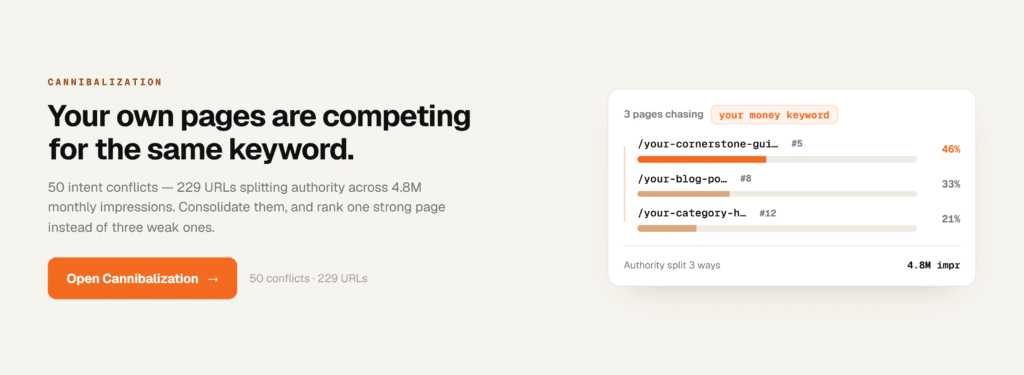
How to Find Keyword Cannibalization in Google Search Console
Google Search Console is one of the most useful free tools for checking which queries and pages receive organic search visibility. Its raw data is accurate and comes directly from Google — but turning that data into clear cannibalization signals takes time and careful analysis.
If you want to cut through the noise faster, GSC Decoder reads your Search Console data and surfaces those patterns in plain English. Its Cannibalization detector flags URLs that trade positions week to week for the same query — exactly the kind of conflict that’s easy to miss when you’re manually sorting rows in a spreadsheet.
That said, here’s how to run the analysis directly in Search Console.
Open the Search Results Performance Report
In Google Search Console, open the Performance section and select the search results report.
Choose a date range long enough to reveal meaningful patterns. Three to six months is often more useful than a shorter window.
Filter the Report by a Target Query
Open the Queries tab and select an important keyword.
You can also add a query filter to examine an exact term or a group of related terms.
Review the Pages Ranking for That Query
After filtering by the query, open the Pages tab.
Search Console shows the URLs that received impressions or clicks for that keyword.
Seeing multiple pages does not confirm cannibalization, but it identifies the URLs that need further analysis.
Compare Clicks, Impressions, CTR, and Average Position
Review how the pages perform.
Ask:
- Does one URL receive most of the clicks?
- Are impressions divided between two similar pages?
- Does one page have a much lower click-through rate?
- Is the wrong page receiving the most visibility?
- Are both pages ranking too low to attract traffic?
Metrics should be interpreted alongside search intent and ranking history.
Look for Competing URLs and Ranking Fluctuations
Compare different date ranges to see whether Google changes the ranking URL.
For example, compare the most recent 28 days with the previous 28 days. A preferred page losing visibility while a similar page gains it may indicate a conflict.
Search Console does not provide a dedicated cannibalization warning, so the pattern must be identified through query and page analysis. Tools like GSC Decoder automate this step — the Cannibalization tab highlights the specific queries where two URLs are splitting clicks and swapping positions, so you can act on the real problems first.
Export the Data for a Larger Cannibalization Audit
For a larger website, export Search Console data into Google Sheets, Excel, or a reporting platform.
Group keywords by query and count the number of associated URLs. Queries connected to several URLs can then be reviewed manually.
Be careful with this method. Branded queries, broad terms, and navigational searches may naturally display multiple pages.
How to Check Keyword Cannibalization With a Google Search
A manual Google search can provide a quick initial view of possible content overlap.
Use the site: Search Operator
Search for your domain and target keyword using this format:
site:example.com "target keyword"
This can reveal pages that mention or target the same phrase.
For example:
site:example.com "keyword research"
The search results may show several pages with similar titles, headings, or descriptions.
Review Pages With Similar Titles and Topics
Look for pages that appear to cover the same subject.
Pay attention to:
- Similar title tags
- Repeated H1 headings
- Nearly identical URL slugs
- Overlapping meta descriptions
- Similar article introductions
- Repeated subtopics
These signals can help you locate possible duplication.
Check Which URL Google Appears to Prioritize
The highest-ranking result may indicate which page Google currently considers most relevant.
However, this does not always mean it is the correct page from a business or conversion perspective.
Understand the Limitations of Manual Search Results
Manual searches should only be used as a preliminary check.
Search results can vary based on location, device, language, personalization, indexing status, and recent ranking changes. A site: search also does not provide accurate ranking history or performance metrics.
Use it to discover possible conflicts, then verify them with Search Console, GSC Decoder, or another SEO platform.
How to Check Keyword Cannibalization With SEO Tools
SEO platforms can make cannibalization analysis faster, especially for websites with hundreds or thousands of pages.
Using GSC Decoder
If your workflow starts with Google Search Console data, GSC Decoder translates that raw data into clear, actionable findings — without the pivot tables.
Connect your Search Console account or upload your CSV exports, and the Cannibalization module identifies queries where two or more of your URLs are trading positions. It shows you which pages are splitting clicks, which one appears to be winning, and whether the conflict is persistent or occasional.
The Position Movers tab highlights pages gaining or losing ground, which helps you catch emerging cannibalization before it causes significant traffic loss. The Fix Queue consolidates findings from across the tool into one prioritized list, so competing URLs appear alongside other issues — giving you a complete picture of what to address first.
GSC Decoder works directly with data Google has already collected about your site, so the insights reflect real search performance rather than third-party estimates.
Using Ahrefs
Ahrefs is useful for reviewing organic keywords, ranking pages, and position history.
For a target keyword, examine whether multiple URLs have ranked during the selected period. Repeated changes in the ranking URL can indicate that Google is uncertain which page to prioritize.
You can also compare:
- Backlinks
- Organic traffic
- Ranking history
- Top keywords
- Referring domains
- Internal links
These metrics can help identify the strongest consolidation target.
Using Semrush
Semrush provides organic research and position-tracking features that can reveal overlapping URLs.
Depending on the project setup and available features, you may be able to identify keywords associated with multiple landing pages.
Review whether:
- Two URLs alternate positions
- Several pages target the same query
- The preferred landing page is being replaced
- Rankings decline when a competing URL appears
Using Google Sheets or Excel
A spreadsheet is useful when auditing exported keyword data.
Create a table containing:
- Keyword
- URL
- Position
- Clicks
- Impressions
- Search intent
- Preferred page
Use a pivot table to group URLs by keyword. Flag keywords connected to more than one URL, then manually check whether those pages genuinely compete.
Automated flags should be treated as leads rather than final conclusions.
Using a Website Crawler
Website crawlers such as Screaming Frog or Sitebulb can help identify on-page overlap.
Look for:
- Duplicate title tags
- Similar H1 headings
- Near-duplicate content
- Repeated meta descriptions
- Conflicting canonical tags
- Inconsistent internal links
- Thin taxonomy pages
- Multiple indexable URL variations
A crawler cannot determine search intent on its own, but it can reveal structural issues that contribute to cannibalization.
How to Build a Keyword Cannibalization Audit Spreadsheet
A clear audit spreadsheet makes it easier to prioritize problems and document recommended actions.
Recommended Spreadsheet Columns
Include columns for:
- Target keyword
- Search intent
- Ranking URL
- Preferred URL
- Current position
- Clicks
- Impressions
- Click-through rate
- Conversions
- Organic traffic
- Backlinks
- Page type
- Content quality
- Recommended action
- Implementation status
Each row should represent a keyword and URL combination.
Use consistent labels for recommended actions, such as:
- Keep
- Consolidate
- Redirect
- Reoptimize
- Update
- Noindex
- Delete
- Monitor
If you use GSC Decoder, its Fix Queue can serve as a starting point for this spreadsheet. The tool organizes findings by priority and flags the pages that need attention — which saves time when you’re building out a large audit from scratch.
How to Prioritize Cannibalization Issues
Not every overlap requires immediate action.
Prioritize issues involving:
- High-converting keywords
- Commercial or transactional searches
- Major traffic declines
- Strong ranking volatility
- Multiple nearly identical pages
- A weak page outranking a strategic page
- URLs with valuable backlinks
- Pages close to the first page of results
A keyword in position eleven with two competing pages may offer a stronger opportunity than a low-volume keyword with no commercial value.
How to Confirm Whether Cannibalization Is Actually a Problem
Before merging, redirecting, or deleting content, confirm that the pages are creating a genuine conflict.
Do the Pages Target the Same Search Intent?
Two pages may mention the same keyword while answering different questions.
For example, a product page and a troubleshooting guide may both rank for a branded product query. Their purposes are different, so keeping both may be appropriate.
Are the URLs Competing for the Same Query?
Review whether the pages repeatedly rank for the same meaningful keyword.
One incidental impression is not enough to establish cannibalization.
Is Google Switching Between Ranking URLs?
Repeated URL changes are a stronger signal than multiple URLs receiving occasional impressions.
Use ranking history or date comparisons to identify this pattern. GSC Decoder’s Cannibalization tab surfaces exactly this — queries where your pages are swapping positions — so you can focus on confirmed conflicts rather than chasing incidental overlap.
Is Performance Being Divided or Declining?
Look for measurable consequences.
Cannibalization becomes more important when:
- Rankings decline
- Traffic is split
- Conversions fall
- The wrong URL ranks
- Backlinks are divided
- Neither page performs strongly
Could Multiple Results Increase SERP Visibility?
Sometimes having more than one page in the search results is beneficial.
A website may occupy multiple positions because each page satisfies a distinct need. Removing one of those pages could reduce overall visibility.
The goal is not to force one page per keyword. The goal is to ensure each indexable page has a clear and useful purpose.
How to Fix Keyword Cannibalization
The correct solution depends on the quality, intent, authority, and strategic role of each competing page.
Consolidate Overlapping Pages
When two pages provide similar information, combine their strongest elements into one comprehensive resource.
The consolidated page should:
- Fully satisfy the target search intent
- Preserve valuable information
- Include useful examples and supporting details
- Target the primary keyword naturally
- Offer a clear conversion path
- Receive internal links from relevant pages
After consolidation, redirect the weaker URL when appropriate.
Redirect Weaker Pages
Use a permanent redirect when a redundant page no longer needs to exist.
Redirect the weaker page to the most relevant surviving URL. Avoid redirecting unrelated content merely to preserve authority.
Before implementing the redirect, check whether the old page has:
- Valuable backlinks
- Organic traffic
- Conversions
- Unique content
- A different search intent
Important content should be incorporated into the destination page before the redirect is added.
Reoptimize Pages for Different Keywords
If both pages provide value, assign each one a distinct keyword and intent.
For example:
- One page may target “keyword research tools.”
- Another may target “how to do keyword research.”
- A third may target “keyword research services.”
Update the title tag, H1, subheadings, copy, internal links, and calls to action so that each page has a clearly differentiated purpose.
Improve Internal Linking Signals
Internal links help search engines understand page relationships and importance.
Link to the preferred URL from relevant pages using descriptive anchor text. Remove or update internal links that unnecessarily point to weaker competing pages.
Avoid using the exact same anchor text for several pages that target the same intent.
Update Title Tags and Headings
Similar title tags and H1 headings make page purposes difficult to distinguish.
Rewrite them to reflect the unique intent of each page.
For example:
- “Local SEO Guide for Small Businesses”
- “Local SEO Services for Multi-Location Brands”
Both relate to local SEO, but their audiences and goals are different.
Add Canonical Tags When Appropriate
A canonical tag tells search engines which version of a duplicate or near-duplicate page should be treated as the primary version.
Canonicals are useful for situations such as:
- Tracking parameters
- Filtered product pages
- Print versions
- Duplicate product URLs
- Syndicated or replicated content
They should not be treated as a universal solution for strategically different pages. When pages are unnecessarily duplicative, consolidation or redirection is often more appropriate.
Noindex Low-Value Pages
A noindex directive may be suitable for pages that users need, but that should not appear in search results.
Examples may include:
- Internal search pages
- Certain filter combinations
- Thin tag archives
- Private utility pages
- Low-value system-generated pages
Use noindex carefully. Removing a page from search can affect traffic and internal linking value.
Delete Obsolete Content
Some pages offer no continuing value.
Deletion may be appropriate when a page has:
- No meaningful traffic
- No valuable backlinks
- No conversions
- No unique information
- No strategic purpose
- No suitable replacement
When a relevant replacement exists, a redirect is usually preferable to leaving a broken URL.
How to Prevent Keyword Cannibalization
Preventing overlap is easier than repairing a large collection of competing pages.
Maintain a Keyword-to-URL Map
Create a content map that assigns primary keywords and search intents to specific URLs.
Before publishing new content, check whether an existing page already targets the topic.
Assign One Primary Search Intent to Each Page
A page can rank for many related keywords, but it should have one clear primary purpose.
Define:
- Who the page is for
- What question it answers
- What action the user should take
- Which stage of the funnel it supports
This makes content differentiation easier.
Audit Existing Content Before Publishing
Search your website before creating a new page.
Review existing articles, landing pages, category pages, and service pages that may overlap with the proposed topic.
In many cases, updating an established page will produce better results than publishing a new one.
Use Distinct Title Tags and H1 Headings
Each indexable page should have a title and primary heading that accurately describes its unique value.
Avoid producing several pages with only minor keyword variations.
Build Clear Topic Clusters
Organize content around pillar pages and supporting resources.
The pillar page should cover the broad subject, while supporting pages address specific subtopics. Internal links should reinforce the hierarchy and guide users toward related content.
Review Search Console Data Regularly
Cannibalization can appear as a website grows.
Review important queries and landing pages on a regular schedule. Early detection makes conflicts easier to resolve before traffic, links, and conversions become widely distributed.
If reviewing Search Console data manually feels time-consuming, GSC Decoder’s Overview tab gives you a quick health snapshot and flags new issues as they emerge — including competing URLs that are starting to split clicks.
Keyword Cannibalization Checklist
Use this checklist when evaluating a suspected ranking conflict.
Diagnostic Checklist
- More than one URL ranks for the same valuable query.
- The ranking URL changes frequently.
- Competing pages serve the same search intent.
- Titles, headings, and content substantially overlap.
- Traffic or backlinks are divided across similar pages.
- A weaker page outranks the preferred page.
- Rankings declined after similar content was published.
- Neither competing page performs as strongly as expected.
Resolution Checklist
- Select the preferred URL.
- Confirm the dominant search intent.
- Consolidate overlapping information.
- Redirect redundant pages when appropriate.
- Reoptimize valuable pages for distinct topics.
- Update title tags and headings.
- Strengthen internal links to the preferred page.
- Check canonical and indexation settings.
- Monitor rankings, traffic, and conversions after implementation.
Frequently Asked Questions
How Do I Know if I Have Keyword Cannibalization?
Check whether multiple pages repeatedly rank for the same important keyword and satisfy the same search intent.
Strong warning signs include URL switching, declining positions, split traffic, and a lower-priority page outranking the preferred URL.
Google Search Console’s Pages tab — filtered by a target query — is the most direct place to start. GSC Decoder’s Cannibalization module automates this check and presents the results in plain English, so you can spot conflicts without manually comparing date ranges.
Is Keyword Cannibalization Always Bad?
No.
Multiple pages can rank for similar keywords without causing a problem, especially when they serve different intents or allow the website to occupy more than one useful search result.
Cannibalization becomes harmful when similar pages compete and weaken performance.
Can Two Pages Rank for the Same Keyword?
Yes.
Google may rank multiple pages from one website for the same query. This can be beneficial when each page provides distinct value.
Pages should only be consolidated when their overlap creates confusion, instability, or reduced performance.
Does Google Search Console Show Keyword Cannibalization?
Google Search Console does not provide a dedicated cannibalization report.
However, you can filter by a query, open the Pages tab, and review which URLs receive clicks and impressions. Comparing date ranges can also reveal ranking-page changes.
GSC Decoder builds on this workflow. It reads the same Search Console data and surfaces cannibalization conflicts automatically — flagging the specific queries where your pages are trading positions and splitting clicks.
What Is the Best Tool for Finding Keyword Cannibalization?
Google Search Console is a strong free starting point because it shows query and page performance directly from Google Search.
GSC Decoder is a practical next step if you want those insights without the manual analysis. It connects to your Search Console account, identifies competing URLs, and explains what’s happening in plain English — including which pages are involved, how often they swap positions, and where the conflict is most damaging.
Ahrefs and Semrush provide additional ranking history, backlink data, and competitor-style reporting. Spreadsheets remain useful for organizing larger audits and documenting recommended actions.
Should I Delete Cannibalized Pages?
Not automatically.
A competing page may contain valuable content, backlinks, traffic, or conversions. Depending on the situation, it may be better to consolidate, redirect, update, or retarget the page.
Deletion is most appropriate when the page has no unique value and no relevant replacement is needed.
How Long Does It Take to Fix Keyword Cannibalization?
The implementation may be immediate, but search engines need time to recrawl the pages, process redirects, evaluate content changes, and adjust rankings.
Monitor performance over several weeks. Competitive keywords and large websites may require longer observation periods.
Can Internal Links Cause Keyword Cannibalization?
Internal links do not usually create cannibalization by themselves, but inconsistent linking can make an existing conflict worse.
When several pages receive similar anchor text for the same topic, search engines may have difficulty determining which URL is most important. A clearer internal-linking structure can reinforce the preferred page.
Find Competing Pages and Clarify Their Purpose
Checking for keyword cannibalization is not simply a matter of finding every keyword associated with multiple URLs.
You must determine whether the pages satisfy the same search intent, compete for the same position, divide ranking signals, or send users to the wrong destination.
Start by identifying important keywords in Google Search Console. Review every ranking URL, compare search intent, analyze historical performance, and choose the page that should be prioritized. If you want to move faster, GSC Decoder translates that same Search Console data into a prioritized list of conflicts — so you spend less time in spreadsheets and more time fixing the pages that actually matter.
Then apply the most appropriate solution: consolidate overlapping pages, redirect redundant URLs, differentiate valuable content, strengthen internal links, or remove low-value pages.
The objective is not to eliminate all keyword overlap. It is to give every page a distinct purpose and ensure that your strongest URL has the clearest possible opportunity to rank.