If you’ve opened Google Search Console and spotted the “Crawled – Currently Not Indexed” status, you’re not alone. This is one of the most common—and most misunderstood—Page Indexing report entries site owners encounter. It means Googlebot successfully accessed your URL, but Google has not added it to its search index. The page may be reconsidered later, but persistent cases require a closer look at content value, duplication, canonical signals, internal linking, rendering, and overall site quality. This guide walks you through every step—from diagnosis to fix to prevention.
Key Takeaways
- “Crawled – Currently Not Indexed” is not a penalty. It is an indexing decision based on value, duplication, or technical signals.
- Successful crawling does not guarantee indexing. Google separates the two stages entirely.
- Not every URL should be indexed. Some exclusions are expected and appropriate.
- The most common causes are thin content, duplicate content, weak internal linking, canonical mismatches, and rendering failures.
- Fixing the root cause—not repeatedly clicking “Request Indexing”—is what resolves persistent cases.
What Is “Crawled – Currently Not Indexed” in Google Search Console?
Google’s Definition of the Status
The status appears in two places inside Google Search Console: the Page Indexing report (under Indexing > Pages) and the URL Inspection tool when you inspect a specific URL.
The Page Indexing report groups all known URLs into indexed and non-indexed buckets. “Crawled – Currently Not Indexed” falls under the non-indexed section, listed as an excluded status.
Here is the key distinction: crawling and indexing are separate processes. Crawling means Googlebot visited the URL and downloaded its content. Indexing means Google analyzed that content, determined its value, and stored it in the Google index—the database used to serve search results.
A crawled URL passed the first gate. It did not pass the second. According to Google’s own documentation, “indexing isn’t guaranteed; not every page that Google processes will be indexed.” Google may reassess the URL during a future crawl. Whether it does, and how quickly, depends on signals discussed throughout this guide.
Does the Status Mean Something Is Broken?
Not necessarily. This status covers two very different scenarios:
- The page has a real problem. There may be a technical issue, a content quality gap, a canonical conflict, or a rendering failure preventing indexation.
- Google evaluated the page and decided not to include it. The page may be technically accessible, crawlable, and functional—but Google determined it doesn’t provide enough unique value, or that another URL better satisfies the same intent.
This distinction matters. Jumping straight to “fixes” without identifying which scenario applies can send you down the wrong path. Some cases are URL-level (a single page has a specific issue). Others reveal sitewide patterns (a template generates thousands of near-identical URLs).
Should Every Crawled Page Be Indexed?
No. Not every accessible URL deserves or needs indexation. Before treating every occurrence as a problem, ask whether the URL should appear in organic search at all.
URLs that appropriately remain unindexed include:
- Filter and parameter URLs (e.g.,
/products?color=blue&size=M) - Internal search results pages (e.g.,
/search?q=shoes) - Duplicate category or tag pages with minimal unique content
- Login, account, cart, or checkout pages
- Thin tag archives with only one or two entries
- Expired product, event, or job pages with no suitable replacement
- Staging, test, or preview pages
The first diagnostic question for any URL flagged with this status: “Should this URL appear in organic search at all?” If the answer is no, the status is appropriate, and no fix is needed.
Crawling vs. Indexing — How Google Processes a Page
Understanding the process helps explain why a URL can be crawled but still not indexed.
Step 1 — URL Discovery
Before Google can crawl a page, it needs to know the URL exists. Google discovers URLs through:
- Internal links from already-crawled pages
- External links from other websites
- XML sitemaps submitted in Search Console
- Redirects from previously known URLs
- Previously indexed pages that link to new content
Sitemap inclusion helps Google find a URL faster. It is a discovery signal, not an indexing guarantee. Submitting a sitemap does not compel Google to index anything.
Step 2 — Crawling
Crawling means Googlebot sends an HTTP request to the URL and downloads the content. A successful crawl confirms:
- The server responded
- robots.txt allowed access
- The URL returned a response
“Crawled – Currently Not Indexed” confirms the URL passed this stage. Googlebot downloaded the page.
Step 3 — Rendering and Content Processing
After downloading the page, Google renders it—essentially opening it the way a browser would. Google uses a recent version of Chrome to process JavaScript, according to Google Search Central documentation.
This step matters because many modern websites rely on JavaScript to generate or display content. If critical content only appears after user interaction, a failed JavaScript call, or a blocked API request, Google may render an empty or incomplete page. That content never enters the indexing evaluation.
Common rendering failures include:
- Client-side rendering where initial HTML is nearly empty
- Content blocked behind click, scroll, or hover events
- Blocked scripts, CSS, or third-party API requests
- Mobile and desktop versions returning different core content
- Intermittent server errors during rendering
Step 4 — Canonicalization and Indexing
After rendering, Google evaluates whether the page deserves to be in the index—and whether it is the best representative of its content.
According to Google Search Central, “during the indexing process, Google determines if a page is a duplicate of another page on the internet or canonical.” Google groups similar URLs into clusters and selects one canonical URL—the version most likely to appear in search results.
This means a crawled page may be excluded because:
- Google identified it as a duplicate of another URL
- Google selected a different canonical than the one you declared
- The declared canonical points to a redirect, error, or unrelated page
- Internal links and redirects contradict the canonical tag
Step 5 — Ranking
Indexation and ranking are separate outcomes. A page must normally be indexed before it can rank, but being indexed does not guarantee visibility or traffic. Ranking depends on relevance, authority, and hundreds of additional signals evaluated at query time.
“Crawled – Currently Not Indexed” means the process stalled at Step 4. The page never entered the pool eligible for ranking.
“Crawled – Currently Not Indexed” vs. Other Search Console Statuses
Crawled – Currently Not Indexed vs. Discovered – Currently Not Indexed
These two statuses look similar but require different diagnostic approaches.
| Status | Has Google found the URL? | Has Google crawled it? | Primary diagnostic focus |
|---|---|---|---|
| Discovered – currently not indexed | Yes | Not necessarily | Discovery, crawl demand, server capacity, site architecture |
| Crawled – currently not indexed | Yes | Yes | Value, duplication, canonicalization, rendering, sitewide quality |
“Discovered – currently not indexed” means Google found the URL but has not visited it yet. This often points to crawl-budget constraints, server issues, or poor site architecture preventing access. “Crawled – currently not indexed” means Google visited the page but chose not to index it after evaluation.
Crawled – Currently Not Indexed vs. Excluded by “Noindex”
“Excluded by ‘noindex’ tag” means a noindex directive is present on the page, either in the HTML <meta> tag or the X-Robots-Tag HTTP header. Both statuses result in exclusion, but they represent different root causes.
- Crawled – Currently Not Indexed = Google made the exclusion decision
- Excluded by ‘noindex’ = you (or your CMS) made the exclusion decision
An intentional noindex on a low-value page is not a problem to fix. An accidental noindex on an important page is. Always check the URL Inspection tool to confirm which directive—if any—is in play.
Crawled – Currently Not Indexed vs. Duplicate or Canonical Statuses
A URL currently showing as “Crawled – Currently Not Indexed” may later move into a more specific status as Google processes more signals. Statuses to watch for include:
- Alternate page with proper canonical tag — Google accepted your canonical, but the URL is not the preferred version
- Duplicate without user-selected canonical — Google found a near-duplicate but no canonical tag to guide it
- Google chose different canonical than user — Google overrode your declared canonical
If you see “Crawled – Currently Not Indexed” on a page that has a close competitor URL on the same site, check the Google-selected canonical in URL Inspection. Google may already be consolidating signals under a different URL.
Crawled – Currently Not Indexed vs. Soft 404
A soft 404 occurs when a page returns a 200 OK HTTP status code, but the page behaves like an error—empty content, no useful information, or a message like “No results found” or “Out of stock.”
Google may label these pages as “Crawled – Currently Not Indexed” rather than as a formal soft 404. Pages commonly triggering this pattern include:
- Out-of-stock product pages with no content beyond an unavailability message
- Empty category pages with no products
- Zero-result internal search pages
- Expired event or job pages with no replacement content
The HTTP status says the page is fine. The content says otherwise.
Why Does Google Crawl a Page but Not Index It?
The Page Provides Limited Unique Value
Google’s index has limits. According to Google, “Google doesn’t guarantee that it will crawl, index, or serve your page.” One of the most common reasons a page stays unindexed is that it does not provide enough value to justify inclusion.
This applies to:
- Short answers already covered more thoroughly elsewhere on the web
- Generic information with no original insight
- Competitor content rewritten without analysis, experience, or new evidence
- Pages created to target slight keyword variations of existing content
- Product or service pages with minimal distinguishing information
- AI-generated content published without meaningful editing, first-hand expertise, or supporting evidence
Unique value is not about word count. It is about whether the page satisfies a specific search need better than existing alternatives—on your site and across the web.
The Page Is Duplicate or Substantially Similar
Google avoids indexing multiple pages that cover the same ground. Near-duplicate content does not carry a formal penalty, but Google filters similar pages to maintain search quality.
Duplicate patterns that frequently trigger this status include:
- Near-identical service-area pages that swap only the city name
- Product variants sharing the same description across different SKU URLs
- Printer-friendly, tracking-parameter, or UTM versions of the same page
- HTTP/HTTPS and www/non-www duplicates without proper redirects
- Category, tag, author, and archive pages with content overlapping other archives
- Syndicated or manufacturer-supplied product descriptions
- Programmatic pages built from identical templates with minimal data differentiation
Google Selected a Different Canonical URL
Even when a page has unique content, a canonical conflict can prevent it from being indexed under the intended URL.
Common canonical problems include:
- A canonical tag pointing to a redirect, error page, or unrelated URL
- A self-canonical that Google overrides because internal links, redirects, and sitemap entries all point to a different version
- Canonical chains where Page A canonicalizes to Page B, which canonicalizes to Page C
- Inconsistent signals—the canonical says one URL, the sitemap contains a different version, and internal links point to a third
- Internal links pointing primarily to the noncanonical version, signaling to Google that another URL is the real page
The Page Does Not Match a Distinct Search Intent
Each page needs to match what searchers actually want when they use a specific query. When the page format, angle, or purpose does not align with search intent, Google may exclude it.
This happens when:
- Multiple pages on the same site target the same keyword and serve the same purpose
- An informational article competes directly with a product or service page for the same query
- A location page exists for an area the business does not actually serve
- The page title promises one type of content, and the body delivers something different
- Content answers a question users rarely search independently
Internal Linking Is Weak or the Page Is Orphaned
An orphaned page—one with no incoming internal links from other indexed pages—sends a weak signal to Google about its importance and relevance.
Internal linking issues that contribute to this status include:
- No contextual links from related, indexed content
- The URL only discoverable through a sitemap, pagination, or low-value archive
- Generic anchor text like “click here” or “read more”
- Important content buried five or more clicks from the homepage
- Navigation links generated by JavaScript that Googlebot cannot reliably parse
Google uses internal links to understand site architecture, establish relationships between pages, and evaluate perceived importance. A page without incoming links has no structural context.
Google Cannot Reliably Access the Main Content
Crawling succeeds—Google reached the URL. But if rendered HTML does not include the primary content, the page may still be excluded after Google evaluates what it found.
Rendering failures that cause this include:
- JavaScript that loads main content client-side after initial HTML renders
- Content that only appears after user interaction (click, scroll, or form input)
- Blocked scripts, stylesheets, or third-party API requests
- Mobile and desktop versions returning substantially different core content
- Intermittent server errors during rendering
- Empty or near-empty initial HTML returned by a single-page application
The Page Resembles a Soft 404 or Empty Result
Google aims to surface pages that genuinely help users. Pages that technically exist but functionally deliver nothing useful resemble error pages, even when they return 200 OK.
Patterns that trigger soft-404 treatment include:
- Out-of-stock product pages with only an unavailability notice and no alternatives
- Empty category pages with no products or introductory content
- Zero-result internal search pages indexed as standalone URLs
- Expired event or job listing pages with no updated content
- Location pages for areas not actually served
- Placeholder pages published before the content was complete
The Site Contains Too Many Low-Value URLs
This is a sitewide issue rather than a URL-level problem. When a site contains large volumes of near-duplicate or low-value URLs, Google may reduce how aggressively it indexes any URL from that site.
URL patterns that create this problem include:
- Faceted-navigation combinations that generate thousands of filter permutations
- Session IDs and tracking parameters appended to URLs
- Thin taxonomy archives with no curated or original content
- Automatically generated internal search result pages
- Duplicate international or language versions without correct hreflang
- Paginated archives past the first few pages
- Uncontrolled programmatic publishing where templates generate URLs with no minimum quality standard
The Page Is New or Google Has Not Reprocessed It Yet
Some URLs show this status temporarily. A freshly published page, a recently updated page, or a URL discovered after a site migration may appear here while Google works through its crawl queue.
No fixed indexing timeline applies universally. Factors affecting recrawl frequency include site quality, page authority, change frequency, internal-link strength, and crawl demand.
Investigate further when the status persists on high-value pages, or when a clear pattern affects a specific template or directory.
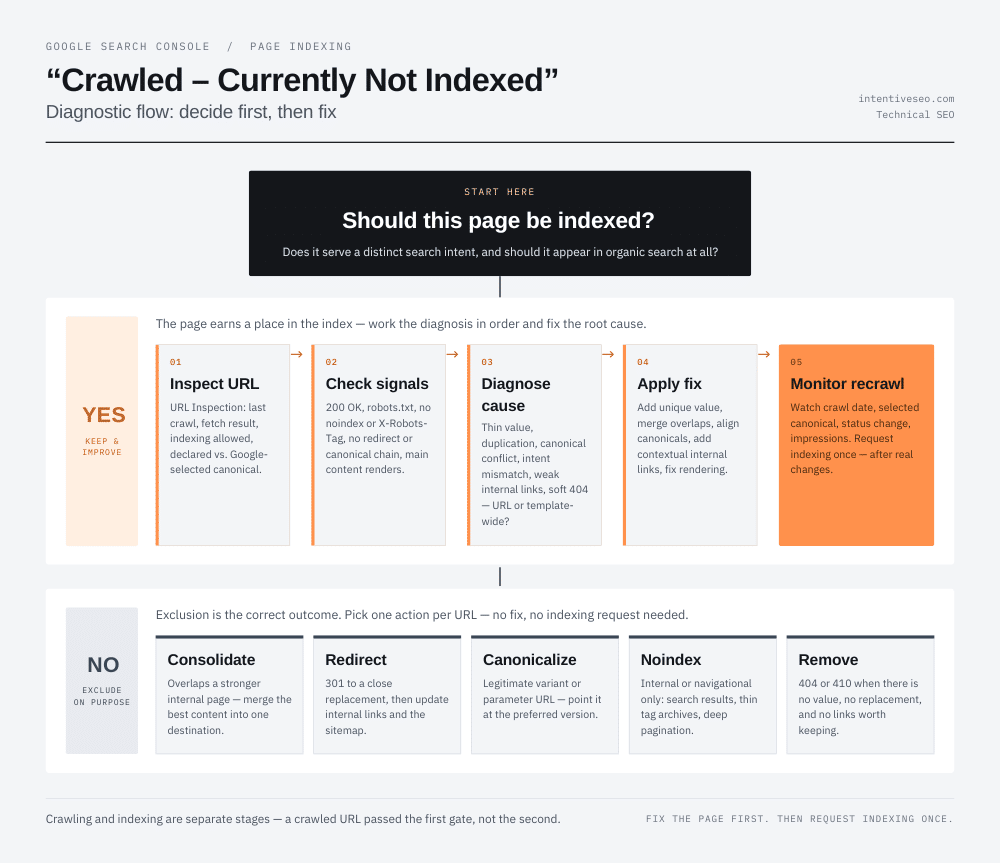
How to Diagnose “Crawled – Currently Not Indexed”
A systematic workflow produces faster, more reliable results than checking random signals. Here are the eight steps I use when diagnosing this status.
Step 1 — Decide Whether the URL Should Be Indexed
Before diagnosing a technical or quality problem, answer these questions:
- Does the page satisfy a real search intent?
- Is it intended to receive organic traffic?
- Is the content meaningfully different from existing pages?
- Does the page support a business or user objective?
- Would users benefit from finding this exact URL in search?
If yes: Continue the diagnostic process.
If no: Consolidate, redirect, canonicalize, add a noindex tag, or remove the URL depending on its purpose and current signals. Exclusion is often the correct outcome.
Step 2 — Inspect the URL in Google Search Console
Open the URL Inspection tool and check:
- Current indexing status — confirms the exclusion
- Last crawl date — an old date may indicate stale data
- Crawled as — desktop or mobile
- Crawl allowed — confirms robots.txt is not blocking access
- Page fetch result — confirms Googlebot can retrieve the URL
- Indexing allowed — confirms no
noindexdirective - User-declared canonical — what your code signals
- Google-selected canonical — what Google chose
- Referring page — one source Google used to find the URL
- Sitemaps containing the URL — sitemap coverage
A mismatch between the user-declared canonical and the Google-selected canonical is one of the most revealing signals this tool provides.
Step 3 — Test the Live URL
Click “Test Live URL” inside URL Inspection. This runs a fresh fetch and render. Compare this result against the last indexed or crawled version.
Confirm:
- Google can retrieve the URL successfully
- The rendered HTML includes the primary heading, body copy, and main content
- Links, images, and structured information appear in the rendered result
- Nothing critical loads only after user interaction
Step 4 — Verify HTTP Status and Indexability Signals
Check for each of the following:
- Page returns
200 OK - Crawling is allowed via robots.txt
- No
noindexin HTML or HTTP header - No conflicting
X-Robots-Tag - No redirect chain
- Canonical points to the intended URL—not a redirect or error
- No mobile-only indexing restriction
- Essential scripts and resources are not blocked
- Page does not behave like a soft 404
One conflicting signal can override everything else.
Step 5 — Compare the Page Against Other URLs on the Site
Google excludes URLs that duplicate or cannibalize existing indexed content. Look for:
- Keyword cannibalization (two or more pages targeting the same primary query)
- Overlapping titles and H1s
- Repeated body content across different URLs
- Similar templates with only names, cities, or locations changed
- A stronger page already serving the same user intent
- Inconsistent canonical and internal-link signals favoring a different URL
If a competing internal page exists, Google has likely selected it as the canonical. Check URL Inspection to confirm.
Step 6 — Evaluate Content Quality and Search-Intent Satisfaction
Use a content audit to assess whether the page deserves to exist independently:
- Does the page contain original information not found elsewhere on the site?
- Does it include first-hand experience, data, examples, or evidence?
- Does it completely cover the topic for the intended query?
- Is the information accurate and sourced?
- Is authorship clear?
- Does the introduction match what the page actually delivers?
- Is there distinct value compared with overlapping internal pages?
- Does the content type match what Google actually surfaces for the target query?
Step 7 — Audit Internal Links and Crawl Depth
Evaluate the internal-link signals pointing to the URL:
- How many internal links point to this URL?
- Do those linking pages have their own indexing authority?
- Is the anchor text descriptive and relevant?
- How many clicks from the homepage or main hub does this page require?
- Are linking pages in the same topical cluster?
- Does the URL appear in breadcrumb navigation?
A page reachable only from a sitemap or deeply nested archive carries weak structural signals regardless of its content quality.
Step 8 — Determine Whether the Issue Is Isolated or Sitewide
Segment affected URLs by:
- Page template
- Directory or subfolder
- Content type
- Publication date range
- Language or region
- Canonical target
- HTTP response code
- Approximate content depth
- Internal-link count
- Intended organic purpose
Sitewide patterns require template-level fixes, not individual edits. An individual URL with a specific issue requires targeted remediation.
How to Fix “Crawled – Currently Not Indexed”
The right fix depends entirely on the diagnosed cause. Here are the most effective remedies tied to each root cause.
Improve the Page’s Unique Value
If the page lacks differentiation, the fix is substantive content improvement—not arbitrary expansion.
Practical steps:
- Add original research, data, screenshots, expert commentary, or first-hand examples
- Answer the primary query directly within the first few paragraphs
- Cover missing subtopics necessary for the user to complete their task
- Remove generic filler sentences that add length without adding value
- Update weak titles and headings so they accurately describe what the content delivers
- Include practical steps, templates, comparisons, or decision criteria
- Demonstrate explicitly why this page deserves to exist separately from similar pages
Merge Pages That Serve the Same Search Intent
When multiple pages target the same query with limited differentiation, consolidation often produces better results than trying to optimize each one independently.
When to consolidate:
- Two or more articles compete for the same primary keyword
- Multiple location pages share the same template with only city names changed
- Thin product or service variant pages exist without meaningful differences
Steps to consolidate correctly:
- Combine the best content from all versions into a single, complete page
- Set up 301 redirects from all merged URLs to the consolidated destination
- Update all internal links to point directly to the consolidated page
- Remove merged URLs from XML sitemaps
Correct Canonicalization Problems
Canonical signals need to be consistent across all sources—tags, sitemaps, internal links, and redirects.
Specific actions:
- Add a self-referencing canonical tag to every indexable page
- Point all duplicate versions (HTTP/HTTPS, www/non-www, tracking parameters) to the correct canonical URL
- Avoid canonicals pointing to redirects, error pages, or unrelated content
- Align sitemap entries, hreflang tags, and internal links with the canonical URL
- Resolve canonical chains where A → B → C
- After making changes, verify Google’s selected canonical using URL Inspection
Strengthen Internal Linking
Internal linking improvements are often among the fastest and most impactful fixes.
Actions to take:
- Identify relevant, indexed pages in the same topical cluster
- Add contextual links with descriptive, keyword-relevant anchor text
- Add the URL to a logical topic hub or pillar page
- Connect supporting articles to the primary page and to each other
- Reduce unnecessary click depth from the homepage or category hub
- Ensure all links use crawlable HTML anchor elements with
hrefattributes—not JavaScriptonclickhandlers
Fix Rendering and Content-Delivery Issues
If important content does not appear in the rendered HTML, Google cannot evaluate it.
Solutions:
- Implement server-side rendering or pre-rendering for JavaScript-heavy pages
- Ensure primary content is available in the initial HTML without requiring user interaction
- Match mobile and desktop content in terms of core information
- Remove or provide fallbacks for blocked dependencies, failed API calls, and missing scripts
- Return accurate HTTP status codes—including
404or410for unavailable resources - Test with URL Inspection’s live-test feature after deploying any rendering changes
Clean Up the XML Sitemap
The sitemap should function as a curated list of indexable, canonical URLs—not an export of every URL the CMS can generate.
Sitemap best practices:
- Include only canonical, indexable URLs that return
200 OK - Remove redirects, error pages, duplicates, and pages with
noindex - Use accurate
lastmodvalues that reflect genuine content changes, not server timestamps - Consider splitting large sitemaps by page type to simplify monitoring
- Treat sitemap submission as a discovery aid, not an indexing trigger
Resolve Soft-404 and Empty-Page Patterns
These pages need either content that genuinely helps users, or a proper HTTP response indicating unavailability.
Decision framework:
- Add useful content when the page should remain accessible (e.g., an out-of-stock product with alternatives listed)
- Return
404or410when no suitable replacement exists and the URL has no valuable incoming links - Redirect (
301) only when a closely relevant replacement exists - Show alternatives on discontinued product, expired event, or closed job pages
- Prevent empty pages from creating URLs by blocking zero-result search pages and empty filter combinations from being indexed or crawled
Improve Sitewide Content Quality
When a template-level pattern drives hundreds or thousands of affected URLs, individual edits cannot scale.
Sitewide improvements to make:
- Audit entire underperforming directories (e.g.,
/blog/,/products/,/locations/) - Consolidate repetitive, near-identical templates
- Remove outdated, factually unsupported, or irrelevant content
- Establish an editorial review step before publication
- Add clear authorship and source attribution where appropriate
- Reduce mass publication of minimally differentiated programmatic pages
- Define distinct indexing criteria for each content type
Request Indexing Only After Meaningful Changes
Using the “Request Indexing” button in URL Inspection can prompt Google to recrawl sooner—but only after you’ve made material improvements.
Important caveats:
- Repeatedly requesting indexing without changing the page does not resolve underlying quality or canonical problems
- Google does not guarantee indexation even after a request
- For large URL sets, rely on corrected architecture, strengthened internal links, updated sitemaps, and natural recrawling rather than manually submitting every URL
Fixes by Website and Page Type
Blog Posts and Editorial Content
Blog indexation failures most commonly trace to one of these causes:
- Topic overlap — two posts target the same primary query
- Weak differentiation — the post covers the same angle as top-ranking competitors without original insight
- Search-intent mismatch — a listicle where Google surfaces how-to guides, or vice versa
- Outdated information — facts or examples that no longer match current reality
- Missing expert input — no first-hand experience or verifiable evidence
- Poor internal-link integration — the post has no contextual links from the main topic cluster
Fix: Audit overlapping posts, consolidate where topics are genuinely redundant, add original evidence and experience, and link from relevant indexed content.
Ecommerce Product Pages
Product pages face distinct indexation challenges:
- Manufacturer descriptions duplicated across hundreds of retailers
- Product variants (size, color) generating separate URLs with identical descriptions
- Out-of-stock pages with nothing useful for visitors
- Filter URLs generating thousands of parameter combinations
- Thin category pages with only a list of products and no introductory content
- Canonical conflicts between variant and parent product pages
Fix: Write original product descriptions, canonicalize variants to the parent product, add alternatives and supporting content to out-of-stock pages, and block or canonicalize filter URLs.
Local Landing Pages
Location pages consistently trigger this status when they function as doorway pages.
Problems include:
- Pages that swap only the city name across identical templates
- No local proof—no projects, staff, testimonials, or service details specific to that area
- Repeated testimonials and service descriptions copied from other location pages
- No directions, local contact information, or regionally specific policies
Fix: Add genuinely local content. Include local project examples, team members, service-area specifics, directions, and unique testimonials. If the business does not actually serve a location, remove or noindex that page.
Programmatic SEO Pages
Programmatic pages scale rapidly and fail at the same speed when the template generates low-value output.
Common failure points:
- Templates with empty or incomplete data fields
- Pages generated for queries with no real search demand
- Minimal unique content beyond what the template inserts automatically
- No quality sampling before publishing thousands of URLs
- No indexation rules that gate publication based on data completeness
Fix: Set minimum unique-data requirements per template. Validate search demand before generating URLs. Use controlled publishing—stage and sample before indexing at scale.
JavaScript and Single-Page Applications
JavaScript-heavy sites add rendering complexity to every indexation question.
Specific issues:
- Client-side rendering producing empty initial HTML
- Routes undiscoverable without JavaScript execution
- Internal links rendered as JavaScript events rather than HTML anchors
- Content delayed by API calls or lazy loading
- Incorrect HTTP status codes returned by JavaScript routing
- Canonical tags generated dynamically and potentially mismatched
Fix: Test every important URL type with URL Inspection's rendered HTML view. Consider server-side rendering or dynamic rendering for critical pages. Ensure internal links use crawlable <a href> elements.
Category, Tag, and Archive Pages
Not every taxonomy page serves an independent search intent.
Questions to ask before indexing taxonomy pages:
- Does this archive serve a query people actually search for?
- Does it contain introductory copy or editorial value beyond a list of posts?
- Does it duplicate another archive covering the same content?
- Does pagination generate deep, low-value page variants?
Fix: Add introductory copy and editorial curation to high-value archives. Apply noindex to thin tag archives and deep pagination. Consolidate duplicate taxonomy structures.
How to Prioritize Affected URLs
Large sites often show hundreds or thousands of URLs with this status. Prioritization is essential.
Prioritize by Organic and Commercial Opportunity
Group affected URLs into four tiers:
| Tier | Description | Priority |
|---|---|---|
| Tier 1 | Revenue-driving pages and high-demand topics | Fix immediately |
| Tier 2 | Supporting content with clear topical value | Fix within current sprint |
| Tier 3 | Low-demand or redundant URLs | Consolidate or noindex |
| Tier 4 | URLs that should not be indexed | Noindex, redirect, or remove |
Spend the majority of remediation time on Tier 1 and Tier 2. For Tier 3 and 4, the correct fix is often intentional exclusion rather than indexation.
Prioritize by Pattern, Not Just Individual URL
A single template affecting 500 URLs has more remediation leverage than editing 500 individual pages.
Steps:
- Group affected URLs by template, directory, or content type
- Identify the most common cause within each group
- Determine the smallest change that resolves the most valuable URLs
Fix the template. Then monitor whether individual outliers need separate attention.
Use an Indexation Decision Matrix
Track affected URLs systematically using a spreadsheet with these columns:
| Column | Purpose |
|---|---|
| URL | The affected page |
| Page type | Template or content category |
| Intended keyword | Primary target query |
| Should be indexed? | Yes / No |
| Current canonical | Your declared canonical |
| Google-selected canonical | From URL Inspection |
| Content quality issue | Thin / Duplicate / Intent mismatch |
| Technical issue | Rendering / Noindex / Canonical conflict |
| Internal-link count | From a site crawler |
| Recommended action | Improve / Merge / Canonicalize / Noindex / Remove |
| Priority | Tier 1–4 |
| Date updated | When the fix was applied |
| Validation status | Pending / Recrawled / Indexed / Still excluded |
How Long Does It Take Google to Index a Fixed Page?
Why There Is No Guaranteed Indexing Timeline
No fixed schedule applies universally. Google recrawls URLs at frequencies influenced by:
- The overall quality signals of the site
- The significance of changes since the last crawl
- The strength of internal links pointing to the URL
- How frequently the site generates meaningful updates
- The URL’s perceived importance relative to others on the same site
Google does not publicly commit to a specific indexing window, and none exists. Some pages move from excluded to indexed within days of a significant improvement. Others take weeks. Some remain excluded despite apparent remediation.
Signs That Google Has Reprocessed the URL
Monitor these signals after applying a fix:
- Updated last crawl date in URL Inspection
- Change in Google-selected canonical
- Movement from excluded to indexed status in the Page Indexing report
- Increase in the indexed-page count for the site
- New or increased impressions in the Performance report for the target query
- Googlebot activity visible in server logs around the relevant URL
Any of these signals confirms Google re-evaluated the page.
When to Reassess the Page
Reassess when:
- The page has been recrawled (confirmed by an updated crawl date) but remains excluded
- No meaningful change appears in Google’s selected canonical
- Improvements have been applied but impressions remain zero over four or more weeks
At this point, compare the page again against the indexed content serving the same query. If a clear reason for separate existence still isn’t apparent, consolidation is likely the most reliable path forward.
How to Prevent “Crawled – Currently Not Indexed” at Scale
Define Which Page Types Are Allowed to Be Indexed
Document explicit indexation rules for every content type before publishing. A simple decision table works:
| Page type | Default indexation | Conditions for exception |
|---|---|---|
| Core product pages | Indexed | Must have original description |
| Product variants | Canonicalized to parent | Index only if meaningfully differentiated |
| Category pages | Indexed | Must have introductory copy |
| Filter / facet URLs | Noindex or canonicalized | Index only if high search demand exists |
| Tag archives | Noindex | Index only if strong standalone intent exists |
| Internal search results | Noindex | No exceptions |
| Location pages | Indexed | Must have genuine local content |
| Expired pages | Redirect or 410 | Redirect only if close replacement exists |
| Pagination | Noindex beyond page 2 | Assess case by case |
Establish Minimum Quality Standards Before Publication
Require each new page to meet these conditions before it is published as indexable:
- A distinct search intent that no existing page serves
- Unique primary content not duplicated elsewhere on the site
- Complete data fields—no placeholder text or empty sections
- A clear canonical URL owned by this page
- At least one contextual internal link from a relevant, indexed page
- Accurate title and H1 that match the actual content
- Useful supporting evidence—examples, data, or original experience
- Editorial review confirming accuracy and completeness
Build Topic Clusters Instead of Isolated Pages
Topic clusters reduce indexation problems by giving every page a clear structural purpose.
Principles:
- Create one pillar page per major topic
- Build supporting pages that each address a specific subtopic
- Link bidirectionally between the pillar and all supporting pages
- Avoid creating multiple articles targeting minor keyword variations of the same query
- Consolidate overlapping queries into comprehensive resources rather than separate thin pages
Control Duplicate and Parameter URLs
URL proliferation drives a high proportion of “Crawled – Currently Not Indexed” cases on medium and large sites.
Controls to put in place:
- Standardize URL formats and enforce them across templates
- Define and document canonical rules for all URL patterns
- Manage faceted navigation with noindex, canonical tags, or robots.txt disallow directives
- Prevent session IDs and tracking parameters from entering crawl paths via internal links
- Remove unnecessary parameters from all internal links
- Monitor for newly generated URL patterns after every CMS or platform change
Maintain Sitemap and Internal-Link Governance
Sitemaps and internal links require ongoing maintenance—not one-time setup.
Governance steps:
- Automate the exclusion of redirected, noncanonical, error, and
noindexURLs from sitemaps - Run scheduled internal-link audits to identify new orphaned pages
- Monitor for pages that lose incoming internal links after content changes
- Ensure all important new URLs receive at least one contextual link from an existing indexed page at or before publication
Monitor Indexation by Template and Directory
Aggregate monitoring catches problems before they affect large URL groups.
Track the following metrics regularly:
- Submitted vs. indexed URLs for each sitemap
- Exclusion rate by page type — a rising rate in one directory signals a template problem
- Newly affected URL patterns after site releases or migrations
- Canonical mismatches identified through crawl data
- Soft 404 growth in the Page Indexing report
- Googlebot activity in server logs for high-priority templates
- Indexation trends after core algorithm updates
Common Mistakes That Do Not Reliably Solve the Problem
Repeatedly Clicking “Request Indexing”
Submitting unchanged URLs repeatedly does not resolve underlying quality, duplication, or canonical problems. Google evaluates what it finds when it crawls the page. If nothing has changed, the outcome rarely changes.
Request indexing once after meaningful improvements.
Adding More Words Without Adding More Value
Expanding a 300-word page to 2,000 words by adding generic filler, repeated subheadings, or restated points does not improve its indexation prospects. Google evaluates usefulness, not length. A longer version of a low-value page is still a low-value page.
Resubmitting the Sitemap Every Day
Frequent, unchanged sitemap resubmissions do not force faster indexing. Sitemaps help Google discover URLs. They do not override Google’s indexing decisions once a URL has been crawled and evaluated.
Building Links Before Fixing the Page
External links do not correct an accidental noindex tag, a broken rendering chain, an inappropriate canonical, a soft 404, or a fundamentally redundant page. Links amplify Google’s ability to evaluate a page—but the page itself needs to provide something worth indexing before that amplification matters.
Fix the page. Then build or earn links.
Changing the Publication Date Without Updating the Content
Updating a publication date stamp without materially changing the content provides no genuine freshness signal. Google evaluates actual content changes, not metadata timestamps.
Assuming Crawl Budget Is Always the Cause
“Crawled – Currently Not Indexed” confirms the URL was already crawled. Crawl budget explains why URLs go undiscovered or unvisited—it does not explain why visited URLs were excluded after evaluation.
For most small and medium sites, persistent cases of this status trace to content value, duplication, canonical signals, or rendering failures—not crawl budget.
Crawl-budget management matters for large or rapidly changing sites with hundreds of thousands of URLs. For sites under that scale, prioritize URL value and deduplication before investigating crawl-rate issues.
Deleting Every Excluded URL
Exclusion is not always a failure. Deleting URLs without an intentional strategy can remove content that has existing internal links, external backlinks, or legitimate but low-search-value purposes.
Before deleting: confirm whether the URL serves a purpose, holds external links worth preserving, or should be redirected to a relevant replacement.
“Crawled – Currently Not Indexed” Diagnostic Checklist
Use this checklist before requesting indexing or making site-level changes.
Technical Checks
- URL returns
200 OKfor a valid, indexable page - Crawling allowed by robots.txt
- Indexing allowed — no
noindexin HTML or HTTP header - Canonical points to the intended URL
- Google can render the main content
- Mobile and desktop content are equivalent in core information
- Page does not resemble a soft 404
- URL is not part of a redirect chain
- No canonical chain or loop
- No conflicting
X-Robots-Tag
Content Checks
- Page serves a distinct search intent
- Content provides genuine unique value
- Information is complete and accurate
- Page is not substantially duplicated internally or externally
- Title and H1 accurately describe the content
- Main answer or value appears prominently—not buried
- Evidence, examples, or first-hand expertise supports claims
- Page is meaningfully better than overlapping internal pages
Discovery and Architecture Checks
- Page has contextual internal links from relevant, indexed pages
- Anchor text is descriptive and relevant
- Page is not orphaned
- Page appears in the correct sitemap
- Sitemap URL is canonical and indexable
- Page sits within a logical topic cluster
- Page is not unnecessarily deep in the site architecture
Final Action
Assign one outcome based on the checklist:
| Outcome | When to choose it |
|---|---|
| Keep and improve | Page should be indexed; gaps in quality or technical signals |
| Merge and redirect | Page overlaps with a stronger internal page |
| Canonicalize | Page is a legitimate duplicate or variant |
| Intentionally noindex | Page serves internal or navigational purposes only |
| Remove with 404 or 410 | Page has no value, no replacement, and no external links |
| Monitor without changes | Exclusion is expected and appropriate |
Frequently Asked Questions About “Crawled – Currently Not Indexed”
Is “Crawled – Currently Not Indexed” a Google penalty?
No. This status is not a manual action or algorithmic penalty. It reflects an indexing decision—Google crawled the page and determined it did not meet the threshold for inclusion at that time. Manual actions appear separately in Google Search Console under “Manual Actions.” Technical exclusions triggered by directives (such as noindex) appear under their own dedicated statuses.
Will Google eventually index a crawled page?
It may, but future inclusion is not guaranteed. Google may reconsider a URL on a future crawl—especially if the page improves, gains stronger internal links, or if competing pages are consolidated. However, Google makes no commitment to index any specific URL. Pages that remain excluded over multiple crawl cycles typically have unresolved content, duplication, or a signal issue that needs direct remediation.
How do I get Google to index a crawled page?
Follow this sequence:
- Confirm the page should be indexed — verify it serves a distinct search intent
- Inspect the URL in Google Search Console to identify conflicting signals
- Remove blocking directives — check for accidental
noindexor canonical mismatches - Improve unique value — add original insight, data, or first-hand experience
- Strengthen internal links — add contextual links from relevant, indexed pages
- Request indexing in URL Inspection only after making meaningful changes
Skipping step six until the previous five are resolved is critical. A request without remediation rarely changes the outcome.
Should I request indexing in Google Search Console?
Yes — but only after you’ve made substantive changes to the page. The “Request Indexing” function prompts Google to recrawl the URL sooner than it might otherwise. It does not override Google’s quality or duplication assessment.
Repeated requests on an unchanged page do not help. If Google crawls the same content again and finds no improvement, the status will not change. Treat the request as a signal that says “something has changed here — please look again,” not as a substitute for fixing the underlying issue.
Does submitting a sitemap guarantee indexing?
No. A sitemap helps Google discover and monitor your URLs. It does not compel Google to index any of them. Once Google has crawled a URL and made an indexing decision, resubmitting the sitemap containing that URL has no direct effect on that decision.
Sitemaps are most valuable for discovery — particularly for new content, deep pages, or recently updated URLs. They work best when they contain only canonical, indexable URLs that return 200 OK.
Can duplicate content cause “Crawled – Currently Not Indexed”?
Yes — and it is one of the most common causes. Duplicate content takes several forms:
- Exact duplicates — identical pages accessible under multiple URLs (HTTP/HTTPS, www/non-www, trailing slash variations)
- Near-duplicates — pages with the same structure and largely the same content, differing only in a city name, product SKU, or minor template variable
- Overlapping search intent — two pages targeting the same primary query with no meaningful differentiation
- Canonical disagreement — Google identifies a better representative URL and consolidates signals there
When Google identifies duplication, it selects one canonical URL and excludes the rest. The excluded URLs frequently appear with this status.
Can thin content cause a page not to be indexed?
Yes. “Thin” in Google’s context does not mean short. It means the page does not adequately satisfy the search intent it targets. A 2,000-word page built from generic statements, filler copy, and reworded competitor content is thin. A 600-word page with original data, a clear answer, and practical examples may not be.
Google evaluates whether the page is distinctly useful — not whether it reaches a specific word count. Pages that cover a topic superficially, lack supporting evidence, or offer nothing beyond what dozens of other pages already provide are candidates for exclusion regardless of length.
Can poor internal linking prevent indexation?
Yes. Internal links serve four functions relevant to indexation:
- Discovery — Google follows internal links to find URLs; orphaned pages may go undiscovered or receive infrequent crawls
- Context — anchor text and surrounding content help Google understand what a page covers
- Site architecture — link structure signals how content is organized and which pages are most important
- Perceived importance — pages with more high-quality internal links are treated as more significant
A page with no incoming internal links from indexed content carries weak structural signals even if the content itself is strong. Add contextual links from relevant pages within the same topical cluster, using descriptive anchor text that reflects the target page’s primary topic.
What is the difference between “Discovered” and “Crawled – Currently Not Indexed”?
“Discovered – currently not indexed” means Google found the URL but has not yet visited it. “Crawled – currently not indexed” means Google visited and processed the URL but chose not to add it to the index. The first is a crawling problem; the second is an indexing decision made after evaluation.
Does crawl budget cause “Crawled – Currently Not Indexed”?
Rarely — at least not for the individual URL showing this status. “Crawled – currently not indexed” confirms Google already spent crawl resources on that URL. Crawl budget explains why URLs go unvisited, not why visited URLs were excluded after evaluation.
That said, large volumes of duplicate, thin, or low-value URLs can create broader crawling and indexing inefficiencies across a site. If Google repeatedly finds low-value content across thousands of URLs, it may reduce overall crawl investment in that site — indirectly affecting how quickly new or improved pages get reassessed. For most small and medium sites, content quality and deduplication matter far more than crawl-rate settings.
Why are newer pages indexed while older pages are not?
Several factors can explain this pattern:
- Search intent match — the newer page targets a query with clearer demand
- Internal linking — the newer page received links from stronger, more relevant pages at launch
- Uniqueness — the newer page covers a topic not already addressed on the site
- Canonical clarity — no competing internal URL creates signal confusion
- Template quality — the newer page uses a stronger content structure
- Perceived value — the older page sits in a directory with low average content quality, reducing Google’s confidence in that section
If an older page remains excluded while newer pages index easily, audit the older page against these factors rather than assuming age is the cause.
Should I delete pages that are not indexed?
Not automatically. Deletion is one of four options — and often not the right one. Choose based on the page’s purpose, link equity, and content potential:
- Improve — if the page targets a valuable query and the content gap is fixable
- Consolidate and redirect (301) — if the page overlaps with a stronger internal page that covers the same intent
- Intentionally exclude — if the page serves a navigational, transactional, or internal purpose and should not appear in organic search
- Remove with 404 or 410 — if the page has no value, no suitable replacement, no external links worth preserving, and no business purpose
Deleting URLs without a clear strategy can eliminate pages that hold external backlinks, support internal architecture, or could be improved into indexable assets. Audit before you act.
Final Takeaway: Give Every Indexable Page a Clear Reason to Exist
“Crawled – currently not indexed” is not a verdict — it is feedback. Google crawled your page, evaluated it, and decided it wasn’t ready for the index. That decision is reversible when you address the actual cause.
The core framework is straightforward:
- Decide whether the page should be indexed at all
- Confirm Google can access and render it without obstruction
- Align canonical, sitemap, and internal-link signals so they all point the same direction
- Make the page distinctly useful — original, complete, and nonredundant
- Resolve sitewide template and URL-inventory problems that generate low-value content at scale
- Monitor recrawling and indexation without repeatedly submitting unchanged URLs
Fix the page first. Then request indexing once.
Ready to audit your excluded pages? Download the Crawled – Currently Not Indexed Audit Checklist to work through every diagnostic step in a structured, repeatable format.
If you’re dealing with persistent exclusions across multiple templates or a large URL inventory, request a technical SEO and indexation audit. Sitewide patterns need sitewide solutions — and the earlier you identify the root cause, the less remediation work you’ll face later.